Classic Drum Machine Timing
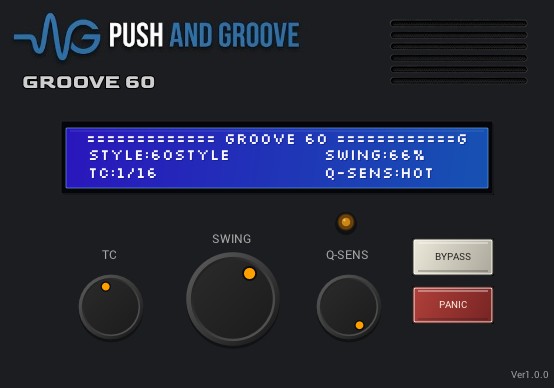
GROOVE60
A non-destructive MIDI timing simulator that brings 96PPQN Timing Correct, swing, and FIFO queue feel into your DAW playback.
Old-school weight without rewriting your MIDI.
GROOVE60 does not randomize notes and does not edit your MIDI clips. It processes timing at playback, then lets you bypass the plug-in to return to the original performance instantly.
Snap playback to a musical grid
Choose OFF, 1/8, 1/8T, 1/16, 1/16T, 1/32, or 1/32T. The source MIDI stays untouched in your DAW.
Push the off-beats
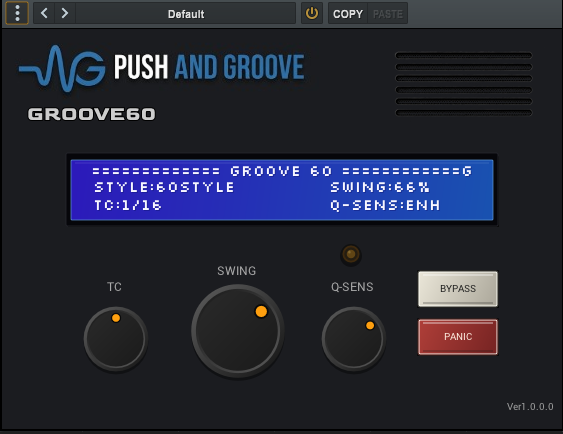
Use 50% for straight timing, 66% for a triplet feel, and 75% for a heavier swing. Swing is active when TC is set to 1/8 or 1/16.
Give stacked MIDI events depth
When multiple notes land at the same or nearly the same time, GROOVE60 preserves their order and lets later events sit slightly behind the first, recreating the subtle processing delay and queue feel of a Classic Drum Machine under load.
Built around a 96PPQN timing grid.
The internal timing model uses 96 pulses per quarter note as its musical reference. Timing Correct, swing, and queue detection all pass through that grid.
- Quarter note: 96 ticks
- Eighth note: 48 ticks
- Sixteenth note: 24 ticks
- Thirty-second note: 12 ticks
Original MIDI clip
  |
  v
GROOVE60 playback timing
  |
  v
Output MIDI
Your DAW note positions remain as they are. GROOVE60 changes the feel of playback, not the clip data.
Simple controls, repeatable feel.
Start subtle, then raise swing or queue sensitivity until the groove sits where you want it.
Insert GROOVE60 on a MIDI track
Use it on drums, hats, percussion, bass lines, or any part where the timing should feel less rigid.
Choose Timing Correct
Try TC:1/16 for common drum and hi-hat patterns. Use TC:1/8 for wider, heavier movement.
Add swing
55-62% is restrained, 62-66% is more pronounced, and 66% or higher creates a stronger bounce.
Set Q-SENS
CLASSIC reacts only when events are tightly stacked. ENHANCED makes the queue feel easier to hear. HOT emphasizes the effect for checking or bold timing color.
Suggested starting points.
These settings are practical defaults for common DAW MIDI parts.
Classic Drum Machine feel
TC:1/16
SWING:60-66%
Q-SENS:CLASSIC
Modern drums with hardware weight
TC:1/16
SWING:56-62%
Q-SENS:ENHANCED
Straight timing with queue feel
TC:1/16
SWING:50%
Q-SENS:ENHANCED
GROOVE60 is not a humanizer.
It does not add random timing drift, velocity variation, jitter, or unpredictable note movement. The feel comes from deterministic MIDI timing decisions: Timing Correct, swing, and FIFO queue processing.
- Adding swing to programmed drum patterns
- Softening overly rigid DAW MIDI playback
- Creating small timing offsets between stacked notes
- Changing groove without editing the original MIDI clip
- Tightening hats, percussion, and bass lines
Controls and specifications.
FAQ
Does GROOVE60 rewrite my MIDI clips?
No. GROOVE60 processes playback timing only. Your notes stay in their original DAW positions.
Why does swing sometimes turn off?
Swing is active only when TC is set to 1/8 or 1/16. With TC OFF, triplet grids, or 1/32 grids, the display shows SWING:OFF.
What does Q-SENS do?
Q-SENS controls how readily GROOVE60 reacts to stacked or near-stacked MIDI events when creating FIFO queue feel.
What does the Queue LED show?
The Queue LED lights only when queue lag is actually generated. It does not light for normal Timing Correct or swing movement.
Can I use it while playing live?
Yes, but Timing Correct and lookahead-style processing can make real-time monitoring feel delayed. GROOVE60 is especially suited to MIDI clip playback inside a DAW.
Find your groove.
Download GROOVE60 and bring 96PPQN timing, swing, and FIFO queue feel into your DAW.
GROOVE60 is inspired by Classic Drum Machine and classic hardware sequencer timing concepts. It is independently developed and is not affiliated with, endorsed by, or presented as an official emulation of any third-party manufacturer or product.